
One Dashboard For Every Network
M-Agent is a mobile money tool for registered agents in Ghana. Enter the number and amount once, and M-Agent navigates the menu for you. No short codes to memorise. No notebook to keep.
- 1,000 plus downloads
- MTN, Telecel and AirtelTigo
- Free to use
- Works offline
What M-Agent Is
M-Agent is built for one job: making the work of a mobile money agent faster and more accurate.
Normally, serving a customer means remembering the right short code for the right network, dialling it, waiting, choosing an option, waiting again, typing the number, typing the amount, and confirming. Do that a hundred times a day and mistakes become expensive.
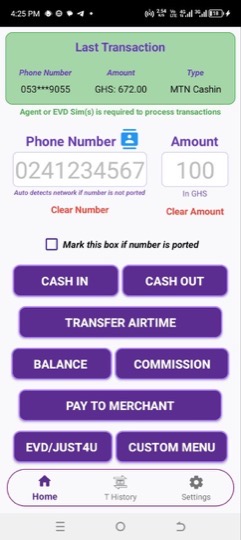
M-Agent gives you one screen instead. You enter the customer's number and amount, confirm the details with the customer in front of you, and tap the transaction you want. M-Agent detects the network from the number and moves through the menu on your behalf. When it reaches the PIN screen, it stops and hands control back to you.
M-Agent never sees, stores, or touches your PIN.
The Problem and What Changed
Before M-Agent
- Every customer means dialling a short code and walking the same menu from the beginning.
- You have to remember which code belongs to which network.
- Numbers are typed by hand, so wrong numbers and wrong amounts happen.
- Transactions are written in a notebook that can be lost, damaged, or filled with handwriting nobody can read later.
- At close of business you sit down with the book and try to match it against your SMS messages.
- There is no fast way to tell which transactions actually went through.
With M-Agent
- One dashboard covers every network and every transaction type.
- The network is detected from the number, so no short code to memorise.
- The number can be pulled straight from your contacts, or suggested from customers you have served before.
- Every transaction is recorded automatically with the customer name, number, amount, type, transaction ID, date and time.
- Each record is marked by status, so you can see at a glance what succeeded and what did not.
- Your full history is on your phone and available offline.
What M-Agent Does
One Dashboard, Every Network
MTN, Telecel and AirtelTigo from a single screen, with the network detected automatically.
Smart Navigation
M-Agent walks the menu for you and hands back at the PIN screen.
Seamless Mode
Hides the flashing menu screens behind a clean processing overlay.
Contact Picker and Number Suggestions
Pull a number from your contacts, or let M-Agent suggest customers you have served before.
Automatic Records
Every transaction is saved with full details the moment it happens.
Transaction Verification
Records are marked Attempted, Pending, Successful, or Failed on their own.
Analytics and Reports
Counts and amounts by day, week, month, or all time, broken down by transaction type.
Custom Menu Builder
Build your own menu for any workflow M-Agent does not cover by default.
Dual SIM Support
Map each network to a SIM slot once and stop switching between lines.
Lock Protection
Secure your history, analytics and settings behind a guard password.
Import and Export History
Back up your records to a file and restore them on another phone.
Offline Access
Everything works and stays available without internet.
How It Works
Install and Create Your Account
Download M-Agent from the Google Play Store, then sign up or continue with Google.
Turn On Smart Navigation
Settings, then App Settings, then enable the Accessibility Service. This is what lets M-Agent walk the menu for you.
Map Your SIM Slots
In the same screen, tell M-Agent which SIM slot holds which network.
Start Serving
Enter the number and amount on the home screen, tap the transaction, and enter your PIN when M-Agent hands control back.
What Agents Are Saying
“This mobile money agent app has made transactions incredibly fast and stress free. The interface is simple, reliable, and easy to navigate. I especially appreciate how it helps track transactions accurately.”
“So far so good. I started using this app three days ago. It has been wonderful. It makes transactions easy and tracks everything. Indicates successful and pending transactions.”
“Currently the best agent app among its peers. Confirmation, history and added interface features well done.”
M-Agent Is Free
M-Agent is free for every registered agent in Ghana. No feature is locked behind a payment. There are no ads.
Running the app still costs money for servers, updates, and support. If M-Agent has helped your business and you want to keep it available for other agents, you can contribute toward those costs. Contributing is entirely optional and changes nothing about what you can do inside the app.
How to support M-AgentCommon Questions
Is M-Agent safe to use?
Yes. M-Agent assists with menu navigation without accessing your funds or interfering with your account. It does not control payments and does not view private data.
Does M-Agent see my PIN?
No. When a transaction reaches the PIN screen, M-Agent stops and hands control back to you. The app never sees, stores, or touches your PIN.
Do I need internet to use it?
No. M-Agent works fully offline. Internet is only needed for app updates and signing in.
Which networks are supported?
MTN Mobile Money, Telecel Cash, and AirtelTigo Money for mobile money, plus MTN, EVD, Telecel and AirtelTigo for airtime transfer.
Why does M-Agent need the accessibility service?
The accessibility service is what allows M-Agent to read the menu prompt on your screen and respond to it. This is the only purpose it is used for, and without it M-Agent cannot navigate anything.
Get M-Agent
Requirements
- Android 7.0 or higher
- A registered mobile money agent SIM, or an EVD SIM
- You must be 18 years or older
Only download M-Agent from the Google Play Store. We do not distribute M-Agent through APK sites, WhatsApp groups, or any other channel.